Rollout in progressB2B · Enterprise SaaSERP · Portal 3.0Self-serve analytics
Helping seven business roles answer their own questions, without waiting on a report queue.
The data lived in the ERP. Access didn't. I led the design of Portal 3.0's reporting module, moving insight from
request-driven static tables to a self-serve widget and dashboard builder that lets operators compose their own
answers from live data.
Some data and figures altered to respect client confidentiality.
Product
ERP Portal 3.0 Reporting module
Role
Lead Product Designer Builder · dashboards · migration
Team
1 BA Design pair · eng squad · PM
Context
Restaurantware ERP 16,000+ SKUs · multi-warehouse
7
ROLE AUDIENCES
12
CHART TYPES PHASE 1
2
LEGACY SCREENS MIGRATED
In rollout
PORTAL 3.0 2025 → 2026
Rollout in progress: adoption metrics not yet available.
What we builtA self-serve analytics system that lets business roles land on relevant KPIs, filter by date, and compose dashboards, without filing a report request.
My role
What I owned, and what I didn't.
I was the design lead on the reporting module, widget builder, role-based dashboard system, composition
behaviour, and migration of legacy KPI screens into Portal 3.0. The BA authored the BRD and owned requirements;
I owned how the builder, role views, and dashboard lifecycle would feel in the product.
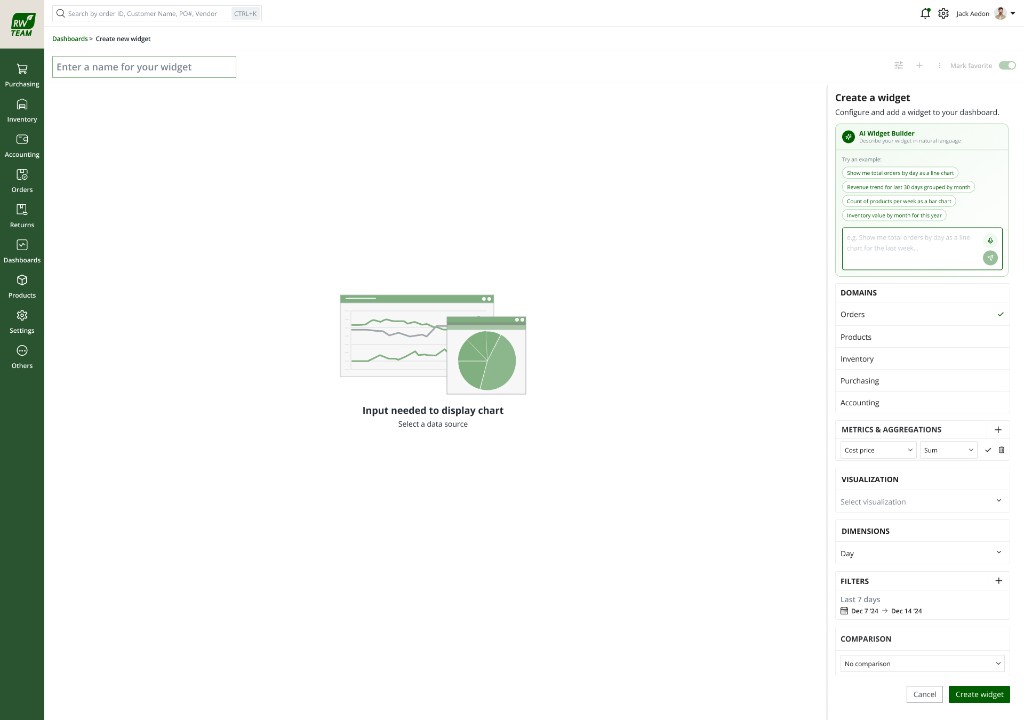
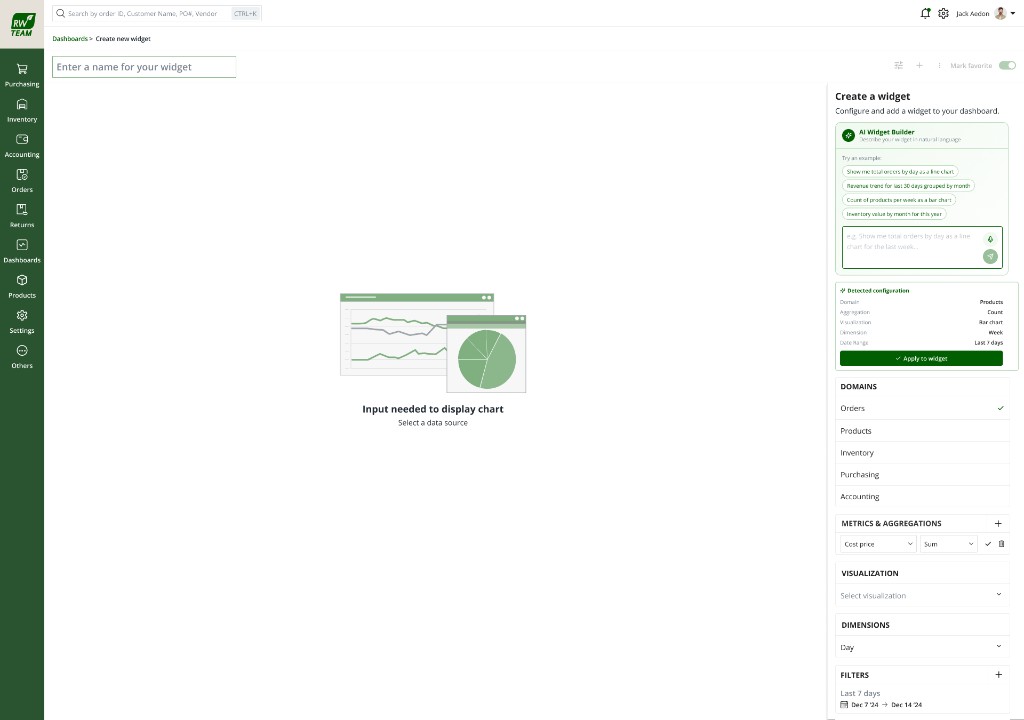
AI widget builder concept (in validation): trust and verify patterns
What I did not own
BRD authoring and requirements ownership (BA)
Backend data layer, query performance, RBAC implementation
Engineering build and deployment
Compliance rule authoring (GDPR / SOC 2 policy)
01 · The Challenge
The data existed. Access to it didn't scale.
The design problem wasn't "add more charts." ERP 2.0 held orders, inventory, sales, accounting,
finance, product, and purchasing data, but every non-standard question became a report request routed
through the team. Operators waited or decided blind. I reframed the goal as self-serve access, not report
production.
7
Business roles needing different slices of the same data
Not one shared dashboard
16k+
SKUs across multiple domains and warehouses
Questions outpace static screens
0
Custom widgets or dashboards in ERP 2.0
Static tables only
Queue
Every new question waited on the team
The real bottleneck
The gap · goal vs. reality
What operators needed
Answer a new question without filing a report request
Land on metrics relevant to their role by default
Compare periods, group data, export for reviews
Trust preserved from legacy Sales Summary / Breakdown screens
Insight in the same session as orders and inventory
What ERP 2.0 offered
Static tables filtered by date, no charts, no custom widgets
No period comparison, no role views, no dashboards
Non-standard questions routed through the report queue
Operators exporting tables to Excel for weekly reviews
Team building one-off views instead of designing the product forward
Where insight gets stuck
Request-driven · every new question repeats the same loop
Need an answerReport requestTeam builds viewWait in queueStatic table
"Can I see top SKUs by margin this quarter?"
Not in the ERP. Unless someone else builds it for you. That loop doesn't scale at 16,000 SKUs.
This became the design brief: stop producing reports for people: build a system they compose
themselves. Widgets they create, dashboards they arrange, role views that arrive already relevant.
02 · Discovery
Who needed what, and how they got it today.
Partnered discovery, not solo ethnography. Before opening Figma I worked with the BA to map role
personas against the metrics each group actually acts on. I audited legacy KPI 2.0 screens, sat with
engineering on Phase 1 data exposure, and traced how non-standard questions became report requests.
Signals below are paraphrased from stakeholder sessions. Not verbatim quotes.
Role audiences · different slices of the same data
Accounting
Receivables, settlement, reconciliation. Not revenue mix.
Stock levels, POs, supplier lead times, inventory-first.
CEO / Overview
Cross-domain summary, revenue, growth, risk at a glance.
Admin
Configures role visibility, who sees which dashboards and metrics.
How questions become answers today
1Static screenFixed KPI 2.0 table
2New questionNot in the screen
3Report requestRouted to team
4WaitQueue grows
5WorkaroundExport to Excel
Key insights
Same data, different slices
Every role needed a different answer from shared ERP data. Not one dashboard for everyone.
Legacy trust to preserve
Sales Summary and Sales Breakdown were the only KPI views used without workaround, their filters and defaults had to carry forward.
Queue was the bottleneck
Stakeholders didn't ask for more chart types first, they asked to stop waiting. Self-serve was the unmet need behind every feature request.
Phase 1 had to be honest
Engineering could expose Orders and Inventory first; Products and PO would follow. The builder had to work within that without feeling broken.
03 · Constraints
Hard boundaries from the BRD, and they shaped every design call.
Product & compliance
Inside Portal 3.0 shell, role-based access control enforced at backend
Migration without regression: legacy Sales Summary & Breakdown must carry forward
Mobile-responsive; every dashboard shows "last updated" stamp
GDPR and SOC 2 alignment for sensitive financial data
Technical & phase limits
Widget generation under 8 seconds (NFR-02), limits valid combinations
Phase 1 domains: Orders and Inventory only; Products and PO follow
Role permission matrix not finalized in BRD: design for configurability
Rollout staged, measured adoption data not yet available
04 · How the thinking evolved
From more reports to a system people compose themselves.
INITIAL FRAMING
Add more chart types to existing KPI screens, expand the fixed library the team already maintained.
SHIFTED FRAMING
Stop producing reports for people; build a system they compose: widgets they create, dashboards they arrange, role views that arrive already relevant.
ReframeFrom a report queue to self-serve. The strategic shift that drove every downstream decision.
Rejected
Expand the fixed report library
Faster to ship incrementally, but doesn't scale, every new question still routes through the team and the queue stays.
Rejected
Embed third-party BI
Rejected on cost, data governance, and fit: operators needed insight in the same session as orders and inventory, not a separate login.
Chosen
Self-serve widget + dashboard builder
Moves access upstream to the user, scales across roles, stays inside Portal 3.0's permission model, at the cost of a far more complex interaction design problem. Prototype evidence in Section 07.
05 · System Design
Domain as gate, each step constrains the next.
I designed the builder as a guided sequence, not a free-form query tool. Domain → measures →
dimensions → filters → visualisation → aggregate, each step constrains the next so invalid combinations
can't be assembled. That was how I balanced configurability with usability for non-analysts.
ModelEach step only offers valid choices, picking Orders vs Inventory filters everything downstream.
Decision
Progressive disclosure over one dense form
More clicks for power users; higher completion rate for the audiences this module is actually for.
Decision
Disable invalid options, don't error
Group-by and certain chart types simply don't appear when they don't apply, prevents failure instead of explaining it.
06 · Design Requirements
What the BRD required, translated into interaction rules.
Domain-scoped fields
Measures, dimensions, and chart types filtered by selected domain.
Primary metric drives chart
Multiple metrics selectable; one primary for visualisation, incompatible series never share a chart.
Group-by where it applies
Enabled for grouped bar, line, horizontal bar, disabled elsewhere, not errored.
Role-based defaults
Each role lands on ~8–10 metrics it acts on; admins configure visibility.
Global date filter
One range cascades to all widgets; last-7-days default on system dashboards.
Compose · save · export
Favourite, default landing, PNG export; duplicates scoped to their dashboard.
07 · The Final Experience
Build → Compose → Consume, decisions first, screens as evidence.
One lifecycle, three surfaces. I designed the product as create a widget, arrange it on a dashboard,
then consume the right view for your role. Screens below appear only after the rationale for each step.
Select a step · rationale before screenshot
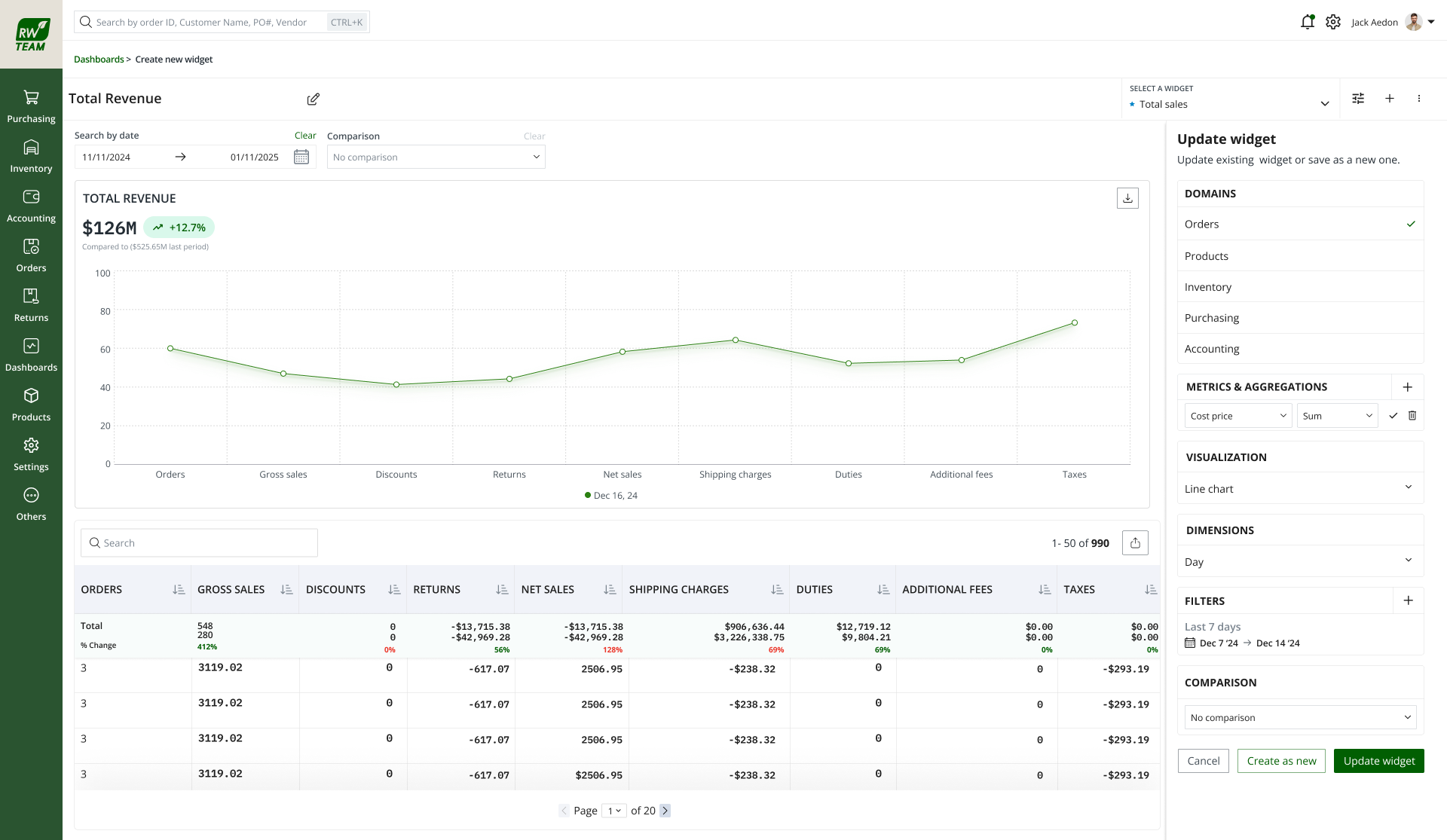
Step 1 · Build a widget
Domain gates everything downstream: invalid combinations can't be assembled.
User goal
Answer a specific question from live ERP data without filing a report request.
I chose progressive disclosure over one dense form, non-analysts complete the path; power users accept the extra clicks.
Expected outcome
A saved widget scoped to a dashboard, exportable as PNG, name capped at 50 characters.
EvidenceOperators could configure a valid widget without training, each step only offered combinations the data layer could serve.
Why this design
Information order: Domain first. The gate that filters every downstream field. Trade-off: More steps than a single query box. I accepted that because error prevention mattered more than speed for this audience.
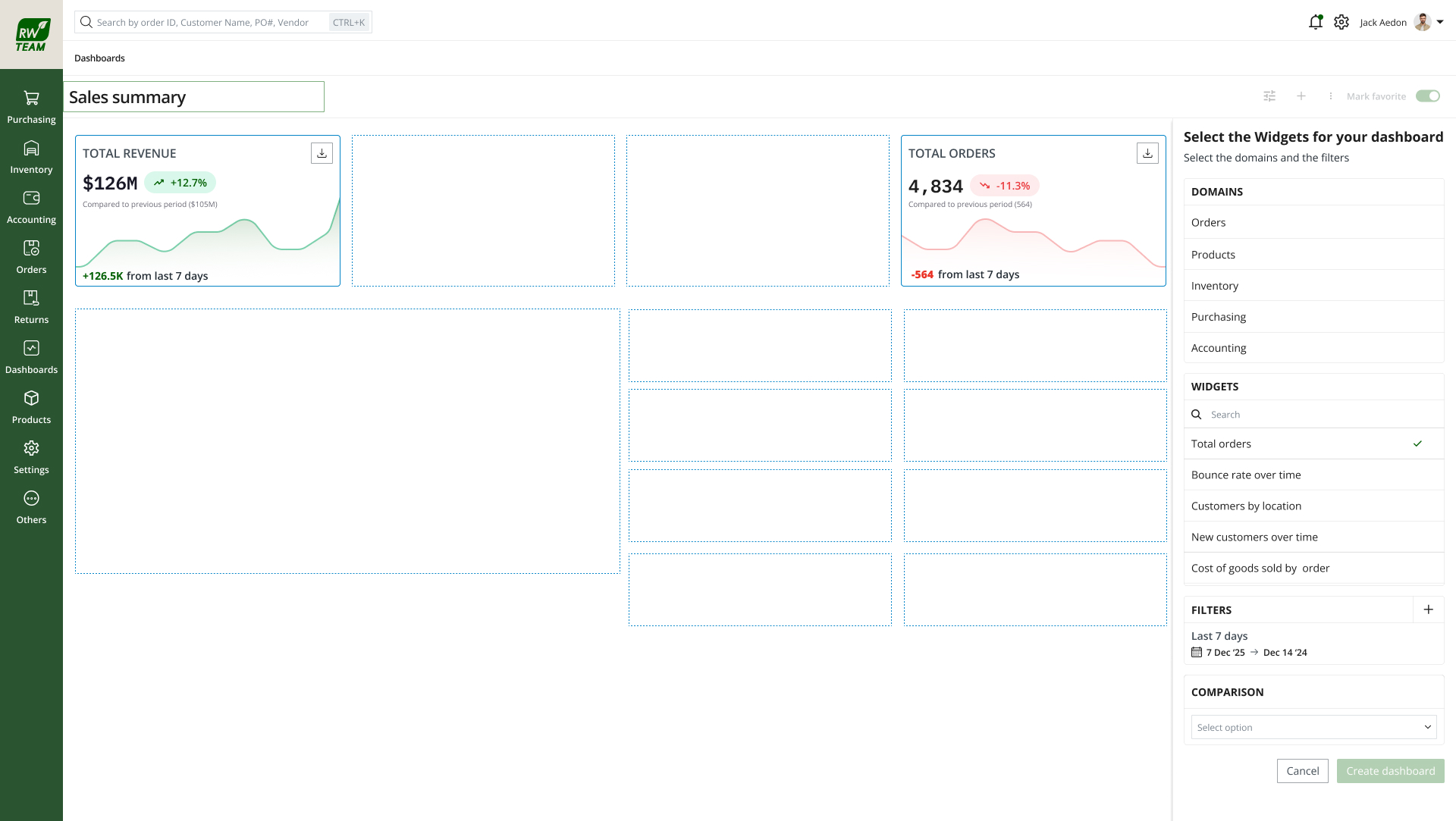
Step 2 · Compose a dashboard
Grid-constrained layout, readable on every device, not free-form chaos.
User goal
Arrange saved and pre-defined widgets into a view they'll return to weekly.
System response
Drag, drop, resize on grid; global date filter cascades; per-widget view, edit, export, remove.
Design rationale
I rejected free-form canvas, looks flexible in demos, breaks on mobile. Grid-constrained resize keeps proportions readable.
Expected outcome
A composable dashboard, favourite, set as default landing, duplicate widgets scoped to this board.
EvidenceTeams could assemble recurring review views once, replacing the weekly Excel export workaround.
Why this design
Layout: Grid lock-in over free drag, uneven gutters kill chart readability on tablet and mobile. Trade-off: Less "canvas" flexibility. Production reliability beat demo flash.
Step 3 · Consume by role
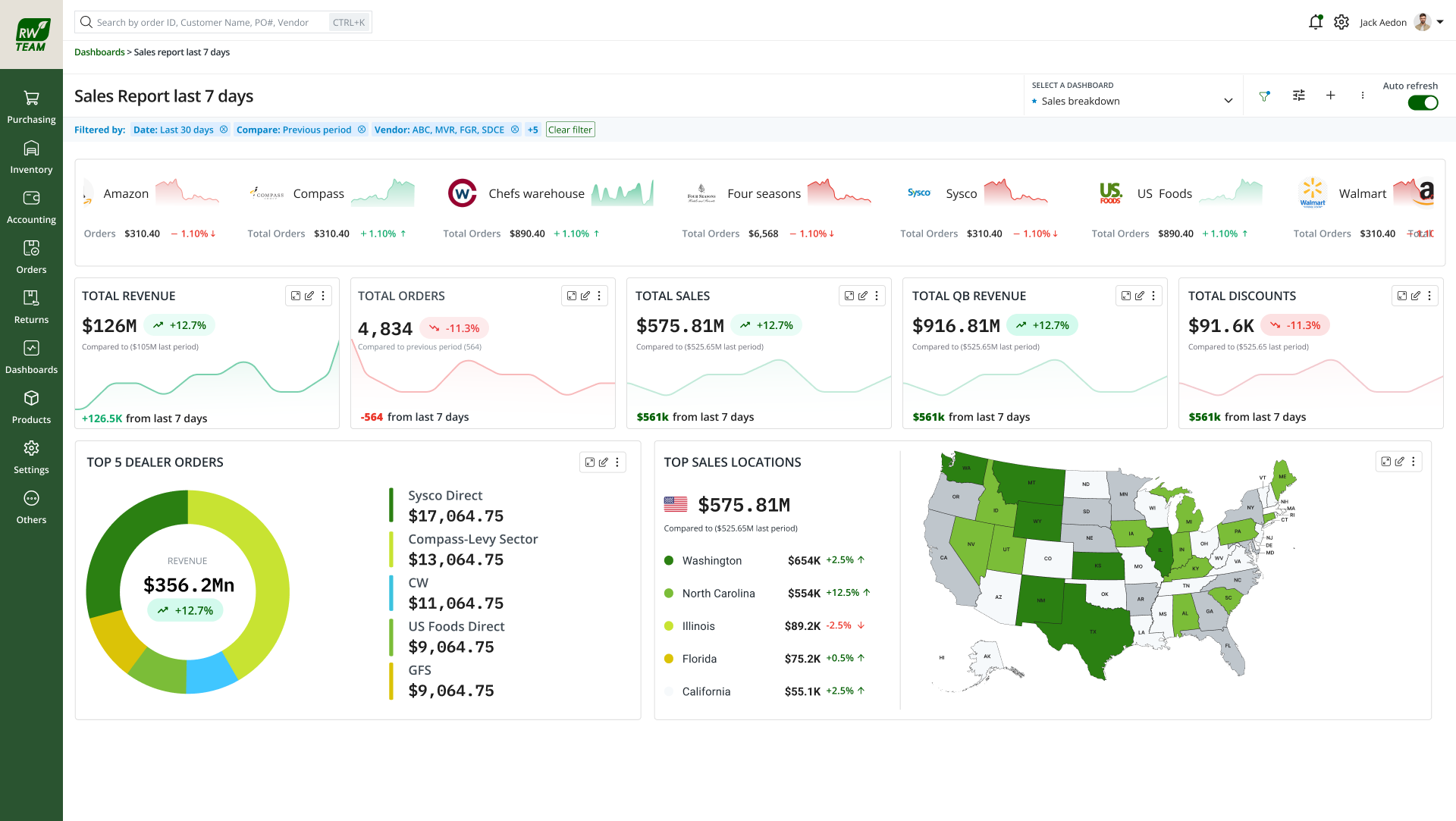
The dashboard arrives already relevant, focus tool, not just security gate.
User goal
Land on the KPIs that match their responsibility: filter by date, drill when needed.
System response
Role-scoped default dashboards (~8–10 metrics); admin-configurable visibility; backend RBAC filters data per user.
Design rationale
I migrated legacy Sales Summary and Breakdown as system dashboards, preserved operator trust while the builder rolled out alongside.
Expected outcome
Self-serve insight in the same session as orders and inventory, no separate BI login, no report queue.
EvidenceEach role landed on metrics it actually acts on, with a global date filter and last-updated stamp for trust.
Why this design
Defaults: Last-7-days on system dashboards, matches how operators already reviewed legacy screens. Trade-off: One system, seven role views to configure. Admins need control; operators need relevance on arrival.
ModelOne system that adapts to who's asking: same data layer, role-scoped default views.
Permission matrix · from BRD
Capability
Admin
Accounting
Finance
Product
Purchasing
CEO
Create widget
✓
✓
✓
✓
✓
—
Save dashboard
✓
✓
✓
✓
✓
—
Download / export
✓
✓
✓
✓
✓
✓
Filters / sort
✓
✓
✓
✓
✓
✓
Group by
✓
✓
✓
✓
✓
—
Expanded view
✓
✓
✓
✓
✓
✓
Favourite
✓
✓
✓
✓
✓
✓
Resize widgets
✓
✓
✓
✓
✓
—
Metric domain
Accounting
Finance
Product
Purchasing
CEO / Overall
Accounting metrics
✓
✓
—
—
✓
Revenue metrics
—
✓
✓
—
✓
Product metrics
—
—
✓
✓
✓
Orders / inventory
—
✓
✓
✓
✓
Matrix structure follows the BRD; exact role permissions were marked "not finalized" in the source document.
Decision
Legacy screens as system dashboards
Re-skinned Sales Summary and Breakdown as read-only system dashboards, preserved operator trust while the builder rolled out alongside.
Decision
Grid-constrained resize
Free drag looks flexible in demos and breaks on mobile. Locking resize to the grid kept charts readable across devices.
08 · Validation
In rollout, measuring against the report queue, not vanity metrics.
Rollout in progress, no adoption percentages yet. Purchasing and Finance onboarded first (Phase 1
domain coverage). I'm measuring whether self-serve replaces the behaviours that created the queue, not
widget counts for their own sake.
Baseline comparison
Report-request volume before vs after; time from question to answer (request → delivery vs build → view).
Operators building saved dashboards instead of weekly Excel exports: early signal, not quantified
Legacy screen migration preserved operator trust during rollout
Projected outcomes
In rollout
Reduced report-request queue volume as self-serve adoption grows
Faster time-to-insight for new questions (build → view vs request → delivery)
10 · Looking Back
One system that adapts, to who's asking.
What surprised me
How much trust lived in two legacy screens. Migration wasn't a nice-to-have, it was the adoption bridge for the whole module.
Wrong assumption
I initially overweighted chart variety. Discovery showed the queue. Not chart types, was the pain. Self-serve access was the real unmet need.
Would do differently
Start validation metrics earlier in rollout, even lightweight queue-volume tracking, instead of waiting for full adoption data.
When several roles need different answers from the same data, don't build several reports: build one system that adapts to who's asking.
Principle carried forward · ERP Portal 3.0
11 · In validation · AI widget builder
Describe the widget, verify before you save.
Validation in progress, no measured results yet. The manual builder is shipped; the AI layer
collapses configuration to a sentence. I designed it to fill the same domain-gated structure. The user
still owns the widget.
AI proposes; the operator verifies. Same trust pattern as HikeOn use cases: suggestion → visible
config → accept, edit, or dismiss. Screens below show the validation prototype, rationale before evidence.
Plain language alongside the manual builder. Not a replacement.
User goal
Skip clicking through six builder steps when they already know what they want.
Design rationale
I kept manual path visible: trust grows when users know they're not locked in.
EvidenceOperators could describe the insight they needed in plain language, without leaving the builder context.
Step 2 · Review the draft
Parsed configuration surfaced before apply. Not a black box.
System response
Maps request to domain, measures, dimensions, filters, visualisation: same structure manual builder enforces.
Design rationale
Ambiguity and confidence surfaced when parse isn't certain, false precision erodes trust faster than honest uncertainty.
EvidenceThe system showed what it understood before applying, so operators could catch misreads early.
Step 3 · Verify and edit
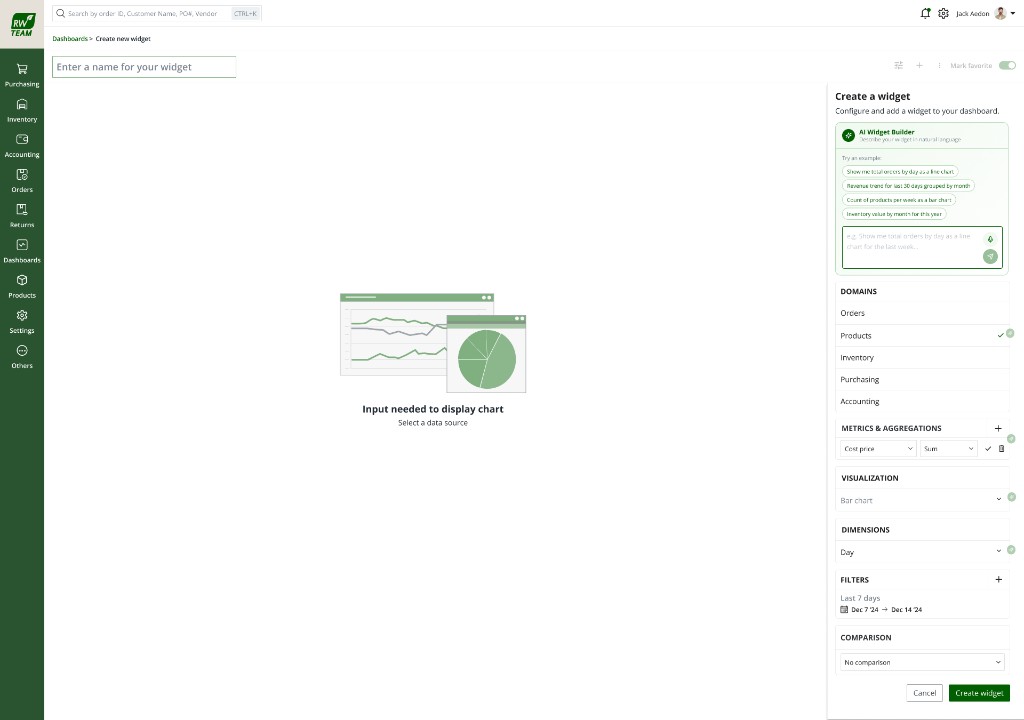
Editable fields. The visible config is the "why this?"
EvidenceEvery drafted field remained editable, accept, edit, or dismiss before the widget was created.
Why this design
AI fills the same domain-gated guardrails, it can't produce an invalid widget because the manual builder's constraints apply to AI output too.
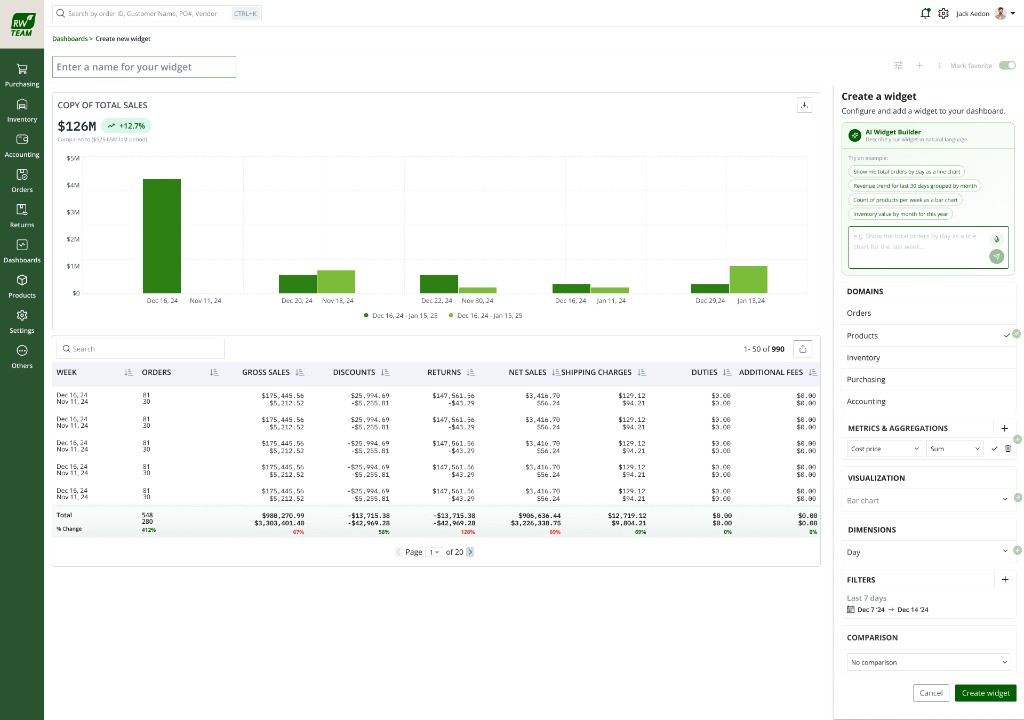
Step 4 · Preview before save
Chart and data table: same confirmation as manual flow.
EvidenceOperators saw chart and table before committing. The same verification moment as the guided builder.
In validation
What we're testing
Parse accuracy against real operator requests; trust and edit rate vs manual builder; time-to-widget. Sessions with Purchasing and Finance operators who already use the shipped builder.
In validation
Status
No measured results yet. This section gets numbers when sessions produce them, not before.